LaneFirst Guides / Contractor website checklist
Contractor website checklist: what your site needs to get calls.
A contractor website has one job: get the visitor to call you or ask for a quote. This checklist covers what has to be on it for that to happen, and you can hold your own site up against it in about 10 minutes.
Free PDF audit in 2 business days: your Maps ranking, reviews vs. competitors, AI search check and your top 5 fixes. See what's in the audit
The short version
Speed goal from web.dev, Google's guide to Core Web Vitals.
What your website is for
Be clear on this first. It decides what stays on the site and what goes.
Most people who land on your site already need the work. Maybe the roof is leaking or the AC quit. They found you on Google or got your name from a neighbor, and now they want to know two things: do you do this job, and can they reach you right now?
So every page should make the next step obvious. Show a call button and a quote button, plus enough proof that you're a real, licensed business. A plain site that does this is doing its job.
Keep this in mind for each item below. If something on your site doesn't help a visitor call you, it can go.
The pages you need
Start with these. A small business rarely needs more until it adds a new service or a new town.
- Home. Who you are, what you do and where. It sends people to the right service page or straight to a call.
- One page per service. A roofer might have roof repair, new roofs and storm damage. An HVAC company might have AC repair, furnace repair and new systems. Each page says what the job is, what to expect and how to book it.
- Service area. The towns and areas you cover, written out. If you go 30 miles out for big jobs but not small ones, say so.
- About. Your name, your story, how long you've run the business, and photos of you and your crew.
- Contact. Phone, email, hours and a short quote form. If you work from home, you can leave your home address off.
What goes on the first screen
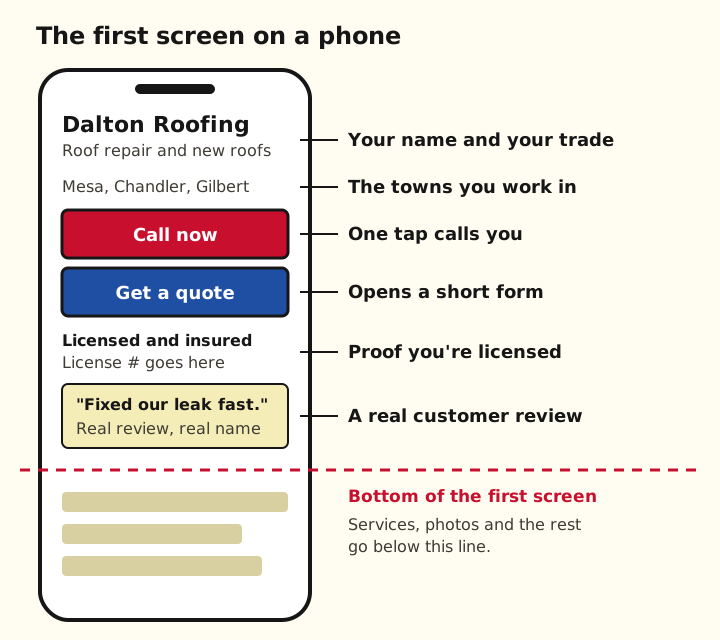
The first screen is what shows on a phone before anyone scrolls. It's all a visitor sees until they scroll, so put the most important things here.
Show you're the real deal
Homeowners are letting you into their house. Before they call, they look for signs you're legit.
- Photos of your real work. Before and after shots from your own jobs, taken on your phone. Stock photos of smiling models look like every other site.
- Reviews from real customers. Show a few, with first names and the town. Link to your Google reviews so people can read the rest.
- Your license number. If your trade needs one where you work, show it near the top and in the footer.
- Proof of insurance. A line that says you're insured is enough on the page. Have the certificate ready to send when someone asks.
- How long you've been at it. "Fixing roofs in Mesa since 2009" tells people you'll still be around if something goes wrong.
Phone basics
Customers often look you up on a phone, sometimes while standing in the yard looking at the problem. Test your site the way they see it.
- Tap to call. Your phone number should be a link. On a phone, one tap starts the call. Test it on your own phone.
- Fast on cell data. The main part of the page should show within 2.5 seconds, per Google's web.dev guide to speed. Check your site with Google's PageSpeed Insights.
- A short quote form. Name, phone, town and what they need. That's enough to call them back. Every extra box is a reason to quit.
- Text big enough to read. Nobody should have to pinch and zoom to read your prices or your hours.
- A secure address. Your web address should start with https and show a padlock. Google's page experience guide asks site owners to check this.
Link it to your Google Business Profile
Your Google profile and your website work as a pair. People often find you on Maps, then tap through to your site.
To set up the profile itself, use our Google Business Profile checklist. To get the review link for your site, see how to find your Google review link.
- Add your website link. Use the full address, starting with https. Google's help page on editing your profile shows where to edit it.
- Link to your own site. Google's profile guidelines ask for a website that represents your business, not a page that sends people somewhere else.
- Match your details. Use the same business name, phone number and towns on your site as on your profile.
- Point people both ways. Put a link to your Google reviews on your site, and keep your profile's website link working.
Score your site
Open your site on your phone and go down this list. Give yourself a point for each yes.
Fix the no answers from the top down. The first two matter most.
- Your trade and towns are on the first screen.
- A tap-to-call button and a quote button are on the first screen.
- Each service you sell has its own page.
- The towns you cover are listed on one page.
- Real photos of your work, no stock models.
- Real reviews, with a link to the rest on Google.
- Your license number and "insured" are easy to spot.
- The quote form asks for four things or fewer.
- The page loads fast on your phone, on cell data.
- The address starts with https.
- Your Google profile links to this site, and the link works.
- Name, phone and towns match your Google profile.
Want it done for you?
LaneFirst builds websites for local service businesses for $299, one time, with a call button at the top, a quote form that goes to your phone or email, and a link to your Google profile. You see the site before you pay. See what's on every site
Rather check your own site first? Your free audit looks at it on a phone: speed, one-tap calling, the quote form, and pages for your services and towns.
Questions
What pages should a contractor website have?
A home page, one page for each service you sell, a page for the towns you work in, an about page and a contact page with a short quote form. Add more only when you add a service or a town.
Do I really need a separate page for each service?
Yes, if you want calls for each one. Someone who searches for gutter repair wants to land on a page about gutter repair. One page that lists ten services gives them nothing to read.
Should I show my license number on my website?
If your state or city gives you one, show it. Put it near the top of the page and in the footer. It costs you nothing and answers a question many homeowners have before they call.
How do I know if my website is fast enough?
Put your web address into Google's PageSpeed Insights tool and check the mobile result. Then open your site on your own phone, on cell data, and see how long it takes before you can tap Call.
Does my Google Business Profile need my website link?
Add it. Your profile is where many customers first find you, and the website button is how they check you out. Use your own site, and make sure the link works.
Written by George, founder of LaneFirst. Updated October 2026. Sources: Google's page experience guide, Google's web.dev guide to Core Web Vitals, and Google Business Profile Help (profile guidelines and editing your profile).
Get your free Google visibility audit
We'll check how you show up on Google Maps, in reviews and in AI answers, compare you with the top 3 businesses near you, and send you a PDF with the 5 fixes that would bring you the most calls. Free, within 2 business days, no obligation.
What's in your free audit
- 1Your Google Maps ranking map. Where you show up for your top 5 searches across your service area, street by street, next to your top 3 competitors.
- 2Google profile scorecard. Categories, services, photos, hours, description and posts, with every missing or wrong item flagged.
- 3Reviews vs. your competitors. Your rating, review count and how many new reviews you've had in the last 90 days, side by side with the top 3.
- 4AI search check. What ChatGPT and Google's AI answer when someone asks for the best business like yours in your city, and whether you're named.
- 5Website check. Is it fast and easy to use on a phone, can people call or request a quote in one tap, and does it have pages for your services and towns? If you have no website, what a site should include.
- 6Listings check. Whether your name, address and phone match on Apple Maps, Bing, Yelp and the main directories for your trade.
- 7Your top 5 fixes, ranked by impact. Clear next steps, including the ones you can do yourself today.
5 to 7 pages, written in plain English. Yours to keep, whether or not you work with us.