LaneFirst Guides / Get more customers
How to get more customers for your home service business.
A roofer, plumber or HVAC company gets new customers when people search Google or Maps, read reviews and ask their neighbors. To get more, work on four things in order: get found, get chosen, be easy to call and keep the customers you have. There's a one-week plan at the end.
Free PDF audit in 2 business days: your Maps ranking, reviews vs. competitors, AI search check and your top 5 fixes. See what's in the audit
The short version
Google quotes from Google's help page on local ranking.
Where your customers come from
A home service business gets work in its own way. People call you when something breaks, and they want someone fast.
- Search and Maps. Someone has a problem at home, types it into Google and calls one of the first few names they see.
- Reviews. Before they call, people read your stars and what customers wrote. Your reviews help decide whether you get the call or the next company does.
- Referrals. A neighbor says "call the guy who fixed our furnace." These callers have often made up their mind before they dial.
- Repeat jobs. A customer who liked your work last year is the easiest call you'll ever get. You just have to stay on their mind.
The path from problem to phone call
Think of it as one path. Fix the weakest step first. Great reviews don't help if nobody finds you, and showing up on Maps doesn't help if nobody can reach you.
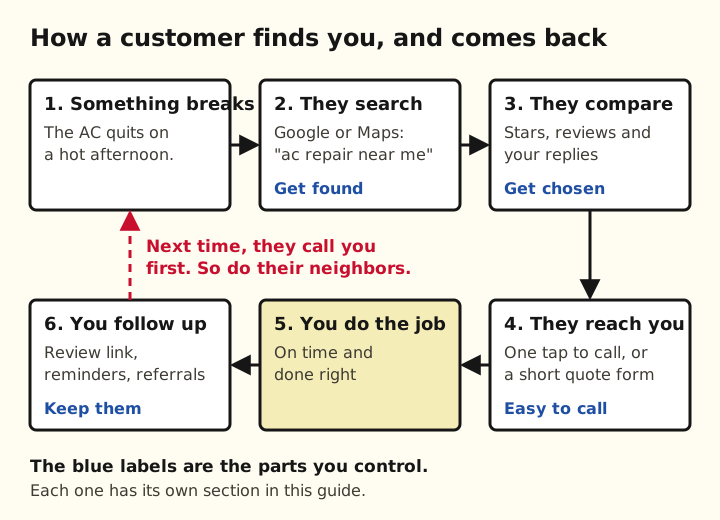
Step 1: Get found on Google and Maps
Your Google Business Profile is the box that shows up on Maps with your name, stars and a Call button. Google's help page on local ranking says local results depend on how well you match the search, how close you are and how well-known you are.
For every field and limit, see our Google Business Profile checklist.
- Pick the right main category. Use the one that matches your main job, like "HVAC contractor" or "Roofing contractor."
- List your services and towns. Add each service you sell and the areas you drive to.
- Keep your hours right. Google lists your hours, including special hours, as part of the info that helps you show up, per Google's help page on local ranking.
- Add real photos. Your trucks, your crew and jobs you've finished. A few new ones each month is plenty.
- Verify the profile. The same Google page says a verified profile is more likely to show up in search results.
Step 2: Get chosen with reviews
When three companies show up, people pick the one with the reviews they trust. Google says positive reviews and helpful replies can help you stand out.
Get your link with how to find your Google review link, and see how to respond to Google reviews for reply templates.
- Ask every customer. Text them a direct link right after the job, while they're happy. Google's help page on reviews says you can share a link or a QR code.
- Don't pay for reviews. Google bans offering discounts or free work in exchange for reviews. the FTC's rule on reviews also bans buying fake reviews and offering a reward only for good ones.
- Reply to every review. Thank people by name and mention the job. Google suggests you skip the same "thank you" for everyone.
- Answer bad reviews calmly. Reply soon, stick to the facts and say how you'll fix it. Never argue or share the customer's private details.
Step 3: Make it easy to call you
Some people tap from your Google profile to your website before they call. Your site needs to make that call easy, especially on a phone.
Our contractor website checklist covers the rest of the site.
- Put your phone number at the top. Make it a link, so one tap on a phone starts the call.
- Add a short quote form. Name, phone, town and what they need. Send it to your phone or email so you see it fast.
- Answer the phone, or call back fast. A missed call on a busy day is a job for someone else. If you can't pick up, call back as soon as you can.
- Match your Google profile. Use the same business name, phone and towns on your site and your profile.
Step 4: Keep the customers you have
A past customer already knows your work. Getting them to call again takes a list and a few texts a year.
Say Rosa runs a small HVAC company. She texts every spring tune-up customer in March and every furnace customer in September. Those texts fill her slow weeks before the rush.
- Text a thank you and your review link. Send it the same day you finish the job.
- Keep a simple customer list. Name, phone, address, job and date. A spreadsheet works fine.
- Send seasonal reminders. HVAC: tune-ups before summer and winter. Roofing: a check after a big storm. Gutters: cleaning in the fall.
- Ask for referrals. Tell happy customers you'd like to work for their friends and neighbors. Asking for referrals and contacting old customers are both on the SBA's list of ways to get new customers.
- Leave something behind. A magnet or sticker with your number on the water heater or furnace means they don't have to search next time.
What to skip or try later
Some things cost money or time and work better once the basics are done. One thing you should never do.
- Buying reviews or review "packages." Skip it for good. It breaks Google's rules and the FTC's rule on reviews.
- Paid leads from Google. Local Services Ads charge you for each lead, such as a phone call you answer, per Google's Local Services help page. Try them after your profile and reviews are in shape, so the leads you pay for turn into jobs.
- Posting on social media every day. Fine if you enjoy it. But people with a leak search Google, so do the steps above first.
- Big discounts for new customers. They can fill a slow week. Used all the time, they teach people to wait for a deal.
A one-week plan
You can do all of this in about an hour a night. Start with day 1 even if you skip the rest.
- Day 1: Your Google profile. Category, services, towns, hours and phone. About an hour.
- Day 2: Photos. Add 10 photos of real jobs, your truck and your crew from your phone.
- Day 3: Review link. Get your link and text it to your last 10 customers.
- Day 4: Replies. Answer every review you haven't replied to yet.
- Day 5: Your website on your phone. Can you call with one tap? Does the quote form reach you? Fix what doesn't work.
- Day 6: Customer list. Pull names and numbers from your invoices into one sheet.
- Day 7: Reminders and referrals. Plan your next seasonal reminder and write the text you'll send to ask for referrals.
Want it done for you?
LaneFirst sets up and manages your Google profile, asks your customers for reviews and replies to every review. Plans start at $299 a month. See how it works for home services or compare plans.
Need a website that gets calls? We build one for $299, one time, and you see it before you pay. See what's on every site.
Not sure which step is your weakest? Your free audit shows where you rank on Maps, how your reviews compare with the top 3 near you, and your top 5 fixes.
Questions
How do small businesses find customers?
For a local service business, people find you by searching Google or Maps, then pick a company by its reviews. The customers you already have are the other big source: repeat jobs and the neighbors they send you. Fix those before you spend money on ads.
What's the fastest way to get more customers for a home service business?
Fill in every part of your Google Business Profile, then text your recent customers a link to leave a review. Both take a few hours, and they help the people who are already searching for your trade find you and pick you.
How can I get more customers for my HVAC business?
The same steps work for HVAC, with one extra: use the seasons. Send tune-up reminders to past customers before summer and before winter, and keep your hours and phone number right on Google for the busy weeks.
Can I give customers a discount for leaving a Google review?
No. Google's review rules ban offering discounts or free services in exchange for reviews. Just ask every customer, and make it easy with a direct link.
Should I pay for Google Local Services Ads?
Maybe later. Google charges you for each lead, such as a call you answer. Get your profile and reviews in good shape first, so the leads you pay for turn into jobs.
What are the 7 steps to attracting new customers?
There's no official list of seven. For a home service business, the order that makes sense is: get found on Google, get reviews, make it easy to call, do good work, follow up, ask for referrals and only then try paid ads.
Written by George, founder of LaneFirst. Updated October 2026. Sources: Google Business Profile Help (local ranking and reviews), Google Local Services Help (how leads work), the FTC's Consumer Reviews and Testimonials Rule Q&A, and the U.S. Small Business Administration.
Get your free Google visibility audit
We'll check how you show up on Google Maps, in reviews and in AI answers, compare you with the top 3 businesses near you, and send you a PDF with the 5 fixes that would bring you the most calls. Free, within 2 business days, no obligation.
What's in your free audit
- 1Your Google Maps ranking map. Where you show up for your main searches across your service area, street by street, next to your top 3 competitors.
- 2Google profile scorecard. Categories, services, photos, hours, description and posts, with every missing or wrong item flagged.
- 3Reviews vs. your competitors. Your rating, review count and how many new reviews you've had in the last 90 days, side by side with the top 3.
- 4AI search check. What ChatGPT and Google's AI answer when someone asks for the best business like yours in your city, and whether you're named.
- 5Website check. Is it fast and easy to use on a phone, can people call or request a quote in one tap, and does it have pages for your services and towns? If you have no website, what a site should include.
- 6Listings check. Whether your name, address and phone match on Apple Maps, Bing, Yelp and the main directories for your trade.
- 7Your top 5 fixes, ranked by impact. Clear next steps, including the ones you can do yourself today.
2 to 3 pages, written in plain English. Yours to keep, whether or not you work with us.